serhii.net
In the middle of the desert you can say anything you want
-
Day 2437 (03 Sep 2025)
Effective presentations
Copied from the old Semantic Wiki. Half of the old links are gone, yet another reminder of bit rot and memento mori.
-
Day 2436 (02 Sep 2025)
Jless as less for jq json data; csvlens
Since forever I have some variations of this:
function lq
    command jq . "$argv" -C | less -r
end
jless - A Command-Line JSON Viewer is this, but much better. Intuitive CLI viewer for json data, works seamlessly for large JSONs (which sometimes breaks my
lqcommand, especially for large lines)Now:
function lq
	echo "not again, Serhii!!! Use jless/jl"
    command jless -r -m line "$argv"
    # command jq . "$argv" -C | less -r
end
Jless
mtoggles the mode between line-mode (jq-like) and the (default) data mode-rdoes relative numbers!-Ndisables any line numbershopens the help, the usual vim things do what I expectHfocuses the parent
- Yank/copy (all below can be
pXto just print the value)yy!!! copy the value, including"ykcopy the KEY under cursorypcopy the path from root to current object
It does yaml as well!
EDIT: for CSVs theres YS-L/csvlens: Command line csv viewer ,
brew install csvlens
GPU memory requirements rules of thumb
Long overdue, will update this page as I find better options.
Tutorials
- Transformer Math 101 | EleutherAI Blog AWESOME — TODO
Links
- LLaMA 7B GPU Memory Requirement - 🤗Transformers - Hugging Face Forums
- 7B full precision => $7*4=28gb$ of GPU RAM
- quantization:
torch_dtype=torch.float16etc. to use half the memory - this is for inference, training requires a bit more.
- quantization:
- Why
*4? storing weights+gradient, better explanation at that link. - based on optimizer, might be
*8etc.
- 7B full precision => $7*4=28gb$ of GPU RAM
- HF: GPU, more about training but less about mental models
Calculators
- Model Memory Utility - a Hugging Face Space by hf-accelerate
- manually select ’transformers'
- results for llama-2.3-1B are 4.6GB total size, 18gb for training
- doesn’t match info above, but matches e.g. Hardware requirements for Llama 3.2 3B with full context 128k? : r/LocalLLaMA — LLM Model VRAM Calculator - a Hugging Face Space by NyxKrage
-
Day 2432 (29 Aug 2025)
Old code to generate Ukrainian eval task for feminitives
Old langchain code for generating pairs of questions about feminitive usage, didn’t use it in my thesis but don’t want to lose it
from langchain.llms import OpenAI
from langchain.chat_models import ChatOpenAI
from langchain.output_parsers import PydanticOutputParser
from langchain.prompts import PromptTemplate
from langchain.pydantic_v1 import BaseModel, Field, validator
from langchain.schema import HumanMessage
from langchain.prompts import PromptTemplate
from langchain.prompts import ChatPromptTemplate
from langchain.schema import BaseOutputParser
from langchain.output_parsers.json import SimpleJsonOutputParser

from tqdm import tqdm

#  from json import loads
from typing import List

from rich import print, inspect

b = breakpoint

# https://openai.com/pricing?ref=ghostcms.tenten.co
MODEL = "text-ada-001"  # cheap, bad
MODEL = "text-davinci-003"  # acceptable
MODEL = "gpt-4"
MODEL = "gpt-3.5-turbo-1106"  # 'capable, cost-effective'

WOMEN_VARIANTS: str = "дівчина, моя сестра, моя жінка, колишня однокласниця, дочка маминої подруги, імена (Марія, Марія Петрівна, Кассандра, та ін.)"
COMPLETE_PROMPT: str = """Наведи будь-ласка {N_PROFS} однозначні короткі дефініції цій професії або слову, так, щоб по ним було однозначно очевидно про яку саме професію йде мова.

Зміни дефініції так, щоб вони стали фразами, де мова однозначно йде про жінку.  Придумай різні варіанти жінок, про яких йде мова, умовно: {WOMEN_VARIANTS}. Але придумай і свої різноманітніші приклади.

Уникай використання самого слова чи поняття у визначеннях. Уникай слів 'фахівецька' чи 'спеціалістка'.

Наприклад:
Актор: "Моя жінка виконує ролі на сцені чи екрані"
Акушерка: "Марія Петрівна допомагає при пологах"
Автор: "Я знаю дівчину, яка пише твори та книжки".

Будь творчим. Але професія, про яку іде мова, має все рівно бути однозначно зрозумілою.
"""

FORMAT_INSTRUCTIONS = """
Формат виводу - JSON. Обʼєкт виглядати таким чином:
{
    "profession": "",
    "description_f": ["", ..., ""]
}

В полі description_f список всіх згенерованих дефініцій для цієї професії.

Виводь тільки код JSON, без ніяких додаткових даних до чи після.
"""

INSTRUCTIONS_GENDER_CHANGE = """Я писатиму речення про професію про жінку. Зміни
речення так, щоб мова йшла про чоловіка, а не жінку, не міняючи сам опис професії.
Імʼя чи опис жінки можеш міняти як завгодно, головне щоб на виході було речення
про чоловіка. """

def get_model(model_name = None):
    model = OpenAI(model_name=model_name, temperature=0.0)
    return model

def run_and_parse(model, profession: str, n_profs: int | str = 3, women: str = WOMEN_VARIANTS):
    prompt = PromptTemplate(
        template="{complete_prompt}\n{format_instructions}\n Професія, яку потрібно описати: {query}\n",
        input_variables=["query"],
        partial_variables={
            "format_instructions": FORMAT_INSTRUCTIONS,
            "complete_prompt": COMPLETE_PROMPT.format(
                N_PROFS=n_profs, WOMEN_VARIANTS=women
            ),
        },
    )

    json_parser = SimpleJsonOutputParser()
    #  prompt_and_model = prompt | model | json_parser
    prompt_and_model = prompt | model
    model_output = prompt_and_model.invoke({"query": profession})
    output = json_parser.parse(model_output)
    return output

def run_and_parse_gender_change(model, profession_description: str):
    prompt = PromptTemplate(
        template="{complete_prompt}\n Речення наступне: {query}\n",
        input_variables=["query"],
        partial_variables={
            #  "format_instructions": FORMAT_INSTRUCTIONS,
            "complete_prompt": INSTRUCTIONS_GENDER_CHANGE
            },
    )

    #  json_parser = SimpleJsonOutputParser()
    #  prompt_and_model = prompt | model | json_parser
    prompt_and_model = prompt | model
    model_output = prompt_and_model.invoke({"query": profession_description})
    output =model_output
    #  b()
    #  output = json_parser.parse(model_output)
    return output

def generate_descriptions(model, profession: str, n_profs: int | str = 3, women: str = WOMEN_VARIANTS, do_male_version:bool = False):
    desc = run_and_parse(model=model, profession=profession, n_profs =n_profs, women=women)
    if do_male_version:
        description_male = list()
        for d in desc['description_f']:
            changed = run_and_parse_gender_change(model=model, profession_description=d)
            description_male.append(changed)
        desc['description_m'] = description_male
    return desc


def run():
    professions_raw = """
    абстракціоністка
    автомобілістка
    авторка
    """
    """
    агрономка
    адвокатка
    анархіст
    англієць
    антрополог
    асистентка
    астронавт
    аптекар
    """
    profs = [x.strip() for x in professions_raw.splitlines()]

    model=get_model(MODEL)

    results = list()
    for p in tqdm(profs):
        r = generate_descriptions(model=model, profession=p, n_profs=2)
        print(r)
        results.append(r)
    print(results)


if __name__ == "__main__":
    run()
{ 'profession': 'лікар', 'description_f': [ 'Моя сестра працює в лікарні та лікує хворих', 'Дочка маминої подруги є лікарем та допомагає людям' ] }, { 'profession': 'абстракціоністка', 'description_f': ['Моя сестра створює картини, які відображають абстрактні ідеї та почуття', 'Дівчина, яку я знаю, малює абстракціоністські полотна' ] }, { 'profession': 'автомобілістка', 'description_f': [ 'Моя сестра вміє водити автомобіль', 'Дочка маминої подруги працює водієм' ] }, { 'profession': 'авторка', 'description_f': [ 'Моя сестра пише книги та статті', 'Дочка маминої подруги є відомою письменницею' ] }, { 'profession': 'Вчитель', 'description_f': [ 'Моя сестра працює в школі та навчає дітей', 'Дочка маминої подруги викладає університетські предмети' ] } ]
-
Day 2421 (18 Aug 2025)
Active training and active testing in ML
- [2103.05331] Active Testing: Sample-Efficient Model Evaluation
- <_(@kossenactivetesting2021) “Active Testing: Sample-Efficient Model Evaluation” (2021) / Jannik Kossen, Sebastian Farquhar, Yarin Gal, Tom Rainforth: z / http://arxiv.org/abs/2103.05331 /
10.48550/arXiv.2103.05331_>1 - Introduces active testing
- <_(@kossenactivetesting2021) “Active Testing: Sample-Efficient Model Evaluation” (2021) / Jannik Kossen, Sebastian Farquhar, Yarin Gal, Tom Rainforth: z / http://arxiv.org/abs/2103.05331 /
- [2101.11665] On Statistical Bias In Active Learning: How and When To Fix It the paper describing the estimator for AL in detail, the one that removes bias when sampling
- [2508.09093] Scaling Up Active Testing to Large Language Models
- <_(@berradascalingactive2025) “Scaling Up Active Testing to Large Language Models” (2025) / Gabrielle Berrada, Jannik Kossen, Muhammed Razzak, Freddie Bickford Smith, Yarin Gal, Tom Rainforth: z / http://arxiv.org/abs/2508.09093 /
10.48550/arXiv.2508.09093_> 2 - adapts it to LLMs to LLMs
- <_(@berradascalingactive2025) “Scaling Up Active Testing to Large Language Models” (2025) / Gabrielle Berrada, Jannik Kossen, Muhammed Razzak, Freddie Bickford Smith, Yarin Gal, Tom Rainforth: z / http://arxiv.org/abs/2508.09093 /
OK, so.
Active testing1
-
Active learning: picking the most useful training instances to the model (e.g. because annotation is expensive, and we pick what to annotate)
-
Active testing: pick the most useful subset of testing instances that approximates the score of the model on the full testing set.
-
We can test(=I use label below) only a subset of the full test set, $D_{test}^{observed}$ from $D_{test}$
-
We decide to label only a subset $N>M$ of the test instances, and not all together, but one at a time, because then we can use the information of the already labeled test instances to pick which next one to label
-
It calls these (estimated or not) test scores test risk, $R$ .
Strategies
- Naive: we uniformly sample the full test dataset
- BUT if $M«N$, its variance will be large, so though it’s uniformly/unbiasedly sampled, it won’t necessarily approximate the real score well
- Actively sampling, to reduce the variance of the estimator.
- Actively selecting introduces biases as well if not done right
- e.g. active learning you label hard points to make it informative, but in active testing testing on hard points will inflate the risk
- Actively selecting introduces biases as well if not done right
Active sampling
- sth monte carlo etc. etc.
- TODO grok the math and stats behind all of this.
- follows my understanding that might be wrong
- The [2101.11665] On Statistical Bias In Active Learning: How and When To Fix It paper that introduces $R_{lure}$ is might be a starting point but at first sight it’s math-heavy
- TL;DR pick the most useful points, and get rid of the biases this introduces (e.g. what if they are all complex?) by using smart auto-correcting mechanisms (=‘unbiased estimator’)
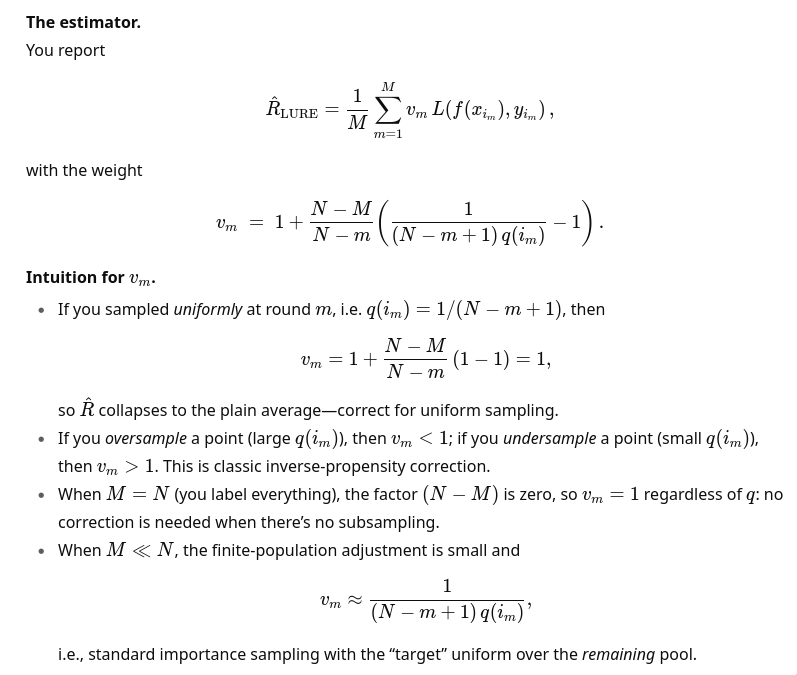
- You have some $q(i_m)$ strategy that picks interesting samples, though they might bias the result.
- $q(i_m)$ is actually shorthand for $q(i_m, i_{1:m-1}, D_{test}, D_{train})$ — so we have access to the the datasets and the already aquired test data.
- $R_{LURE}$: An unbiased estimator that auto-corrects the discribution to be closer to the one expected if you iid-uniformly sample the test dataset.
- ChatGPT on the intuition behind this:
- also:
This is the classic promise of importance sampling: move probability mass toward where the integrand is large/volatile, then down-weight appropriately.
- also:
Bottom line: active testing = (i) pick informative test points stochastically with $q$; (ii) compute a weighted Monte Carlo estimate with $v_m$ to remove selection bias; (iii) enjoy lower variance if $q$ is well-chosen.
-
<_(@kossenactivetesting2021) “Active Testing: Sample-Efficient Model Evaluation” (2021) / Jannik Kossen, Sebastian Farquhar, Yarin Gal, Tom Rainforth: z / http://arxiv.org/abs/2103.05331 /
10.48550/arXiv.2103.05331_> ↩︎ ↩︎ -
<_(@berradascalingactive2025) “Scaling Up Active Testing to Large Language Models” (2025) / Gabrielle Berrada, Jannik Kossen, Muhammed Razzak, Freddie Bickford Smith, Yarin Gal, Tom Rainforth: z / http://arxiv.org/abs/2508.09093 /
10.48550/arXiv.2508.09093_> ↩︎
- [2103.05331] Active Testing: Sample-Efficient Model Evaluation
-
Day 2410 (07 Aug 2025)
fish arguments and functions
- argparse - parse options passed to a fish script or function — fish-shell 4.0.2 documentation
- function - create a function — fish-shell 4.0.2 documentation
Below:
- h/help is a flag
- o/output-dir gets+requires a value
or returnfails on unknown-a/--args- If found, the value is removed from
$argvand put into_flag_argname set -query (tests if var is set)-local
argparse h/help o/output-dir= -- $argv
or return

if set -ql _flag_help
	echo "Usage: script.fish [-o/--output-dir <dir>] <input_files_or_directory>"
	echo "Example: script.fish --output-dir /path/to/output file1.png directory_with_pngs/ dir/*.png"
	exit 0
end

if set -ql _flag_output_dir
	set output_dir $_flag_output_dir
end


for arg in $argv
	# do something with file $arg
end
-
Day 2407 (04 Aug 2025)
Using a private gitlab repository with uv
Scenario:
- your uv source package (that lives in a gitlab source project) depends on a target package from a gitlab target project’s package registry.
- you want
uv addetc. to work transparently - you want gitlab CI/CD pipelines to work transparently
Links
TL;DR
- Have a gitlab token with at least
read_apiscope and Developer+ role - Find the address of the registry through Gitlab UI
https://__token__:glpat-secret-token@gitlab.de/api/v4/projects/1111/packages/pypi/simplehttps://gitlab.de/api/v4/projects/1111/packages/pypi/simple- FROM A GROUP1:
https://gitlab.example.com/api/v4/groups/<group_id>/-/packages/pypi/simple ${CI_API_V4_URL}/projects/${CI_PROJECT_ID}/packages/pypi
- pyproject: add it registry, see below
- to authenticate UV, you can use:
- token inside URI, or
UV_INDEX_PRIVATE_REGISTRY_USERNAME/PASSWORDenv variables, replacing PRIVATE_REGISTRY with the name you gave to it in pyproject.toml~/.netrcfile: .netrc - everything curl
Gitlab
- In Gitlab, use/create an access token with read_xxx permissions in the project —
read_api, read_repository, read_registryare enough — and Developer role. - To get the package registry address,
- Use this URI for the group registry (it’s the best for multiple projects in the same group):
https://gitlab.example.com/api/v4/groups/<group_id>/-/packages/pypi/simple- You can get the group ID from the group page, hamburger menu in upper-right, “copy group id”. Will be an int.
- open the registry, click on a package, click “install” and you’ll see it all:
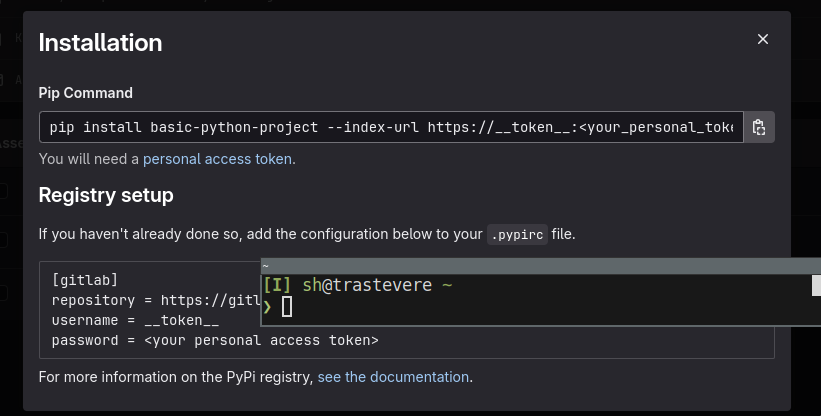
- different packages in different projects will have different registries!
- The project repository URI is generally
${CI_API_V4_URL}/projects/${CI_PROJECT_ID}/packages/pypi/simple
- Use this URI for the group registry (it’s the best for multiple projects in the same group):
UV
Add the new package registry as index
tool.uv.index
name = "my-registry"
url = "https://__token__:glpat-secret-token@gitlab.de/api/v4/projects/1111/packages/pypi/simple"
# authenticate = "always" # see below
# ignore-error-codes = [401]
The URI either contains token inside URI or doesn’t. The examples below are /projects/xxx, ofc a group registry works as well. -
https://__token__:glpat-secret-token@gitlab.de/api/v4/projects/1111/packages/pypi/simple- token inside the URI -https://gitlab.de/api/v4/projects/1111/packages/pypi/simple— auth happening through env. variables or~/.netrcUv auth
Through the server URI
url = "https://__token__:glpat-secret-token@gitlab.de/api/v4/projects/1111/packages/pypi/simple"Through env variables:
export UV_INDEX_PRIVATE_REGISTRY_USERNAME=__token__ export UV_INDEX_PRIVATE_REGISTRY_PASSWORD=glpat-secret-tokenPRIVATE_REGISTRYneeds to be replaced with the name of the registry . So e.g. for the pyproject above it’sUV_INDEX_**MY_REGISTRY**_USERNAME.Through a .netrc file
From Authentication | uv / HTTP Authentication and PyPI packages in the package registry | GitLab Docs: Create a
~/.netrc:machine gitlab.example.com login __token__ password <personal_token>It will use these details, when you
uv add ... -vyou’d see a line likeDEBUG Checking netrc for credentials for https://gitlab.de/api/v4/projects/1111/packages/pypi/simple/packagename/ DEBUG Found credentials in netrc file for https://gitlab.de/api/v4/projects/1111/packages/pypi/simple/packagename/NB
gitwill also use these credentials — so if the token’s scope doesn’t allow e.g. pushing, you won’t be able togit push. Use a wider scope or a personal access token (or env. variables)Usage
- When you
uv add yourpackage, uv looks for packages in all registries- The usual
pypione is on by default
- The usual
- If gitlab doesn’t find one in the gitlab registry or the user is unauthenticated, gitlab by default transparently mirrors pypi
- If auth fails for any of the indexes, uv will fail loudly — you can
ignore-error-codes = [401]to make uv keep looking inside the other registries
Gitlab CI/CD pipelines
CI/CD pipelines have to have access to the package as well, when they run.
GitLab CI/CD job token | GitLab Docs:
You can use a job token to authenticate with GitLab to access another group or project’s resources (the target project). By default, the job token’s group or project must be added to the target project’s allowlist.
In the target project (the one that needs to be resolved, the one with the private registry), in Settings->CI/CD -> Job token permissions add the source project (the one that will access the packages during CI/CD).
You can just add the group parent of all projects as well, then you don’t have to add any individual ones.
Then
$CI_JOB_TOKENcan be used to access the target projects. For example, through a ~/.netrc file (note the username!)machine gitlab.example.com username gitlab-ci-token password $CI_JOB_TOKENBonus round: gitlab-ci-local
I love firecow/gitlab-ci-local.
When running gitlab-ci-local things, the
CI_JOB_TOKENvariable is empty. You can create a.gitlab-ci-local-variables.yaml(don’t forget to gitignore it!) with this variable, it’ll get used automatically and your local CI/CD pipelines will run as well:CI_JOB_TOKEN=glpat-secret-token(or just `gitlab-ci-local –variable CI_JOB_TOKEN=glpat-secret-token your-command)
-
Day 2403 (31 Jul 2025)
jj Jujutsu first impressions
Tutorial and bird’s eye view - Jujutsu docs Git replacement using git under the hood.
First encountered here: Jujutsu for busy devs | Hacker News / Jujutsu For Busy Devs | maddie, wtf?!
For anyone who’s debating whether or not jj is worth learning, I just want to highlight something. Whenever it comes up on Hacker News, there are generally two camps of people: those who haven’t given it a shot yet and those who evangelize it.
Alright, let’s try!
To use on top of an existing git repository:
jj git init --colocate .
jj git clone --colocate git@github.com:maddiemort/maddie-wtf.git
Command line completions:
COMPLETE=fish jj | source
-
Day 2395 (23 Jul 2025)
Firefox awesomeness
How to Firefox | Hacker News / 🦊 How to Firefox - Kaushik Gopal’s Website
- Type
/and start typing for quick find (vs ⌘F). But dig this,'and Firefox will only match text for hyper links - URL bar search shortcuts:
*for bookmarks,%for open tabs,^for history - If you have an obnoxious site disable right click, just hold Shift and Firefox will bypass and show it to you. No add-one required.
(emph mine)
Damn. DAMN.
I need to set this up in qutebrowser as well, it’s brilliant.
- Type
-
Day 2383 (11 Jul 2025)
LLM inference handbook production
For later: Introduction | LLM Inference in Production